Delete or restore your account
You delete your Boardweaver account from Settings. For 30 days after that, you can sign in to restore it. After 30 days, Boardweaver deletes it for good, and you cannot restore it.
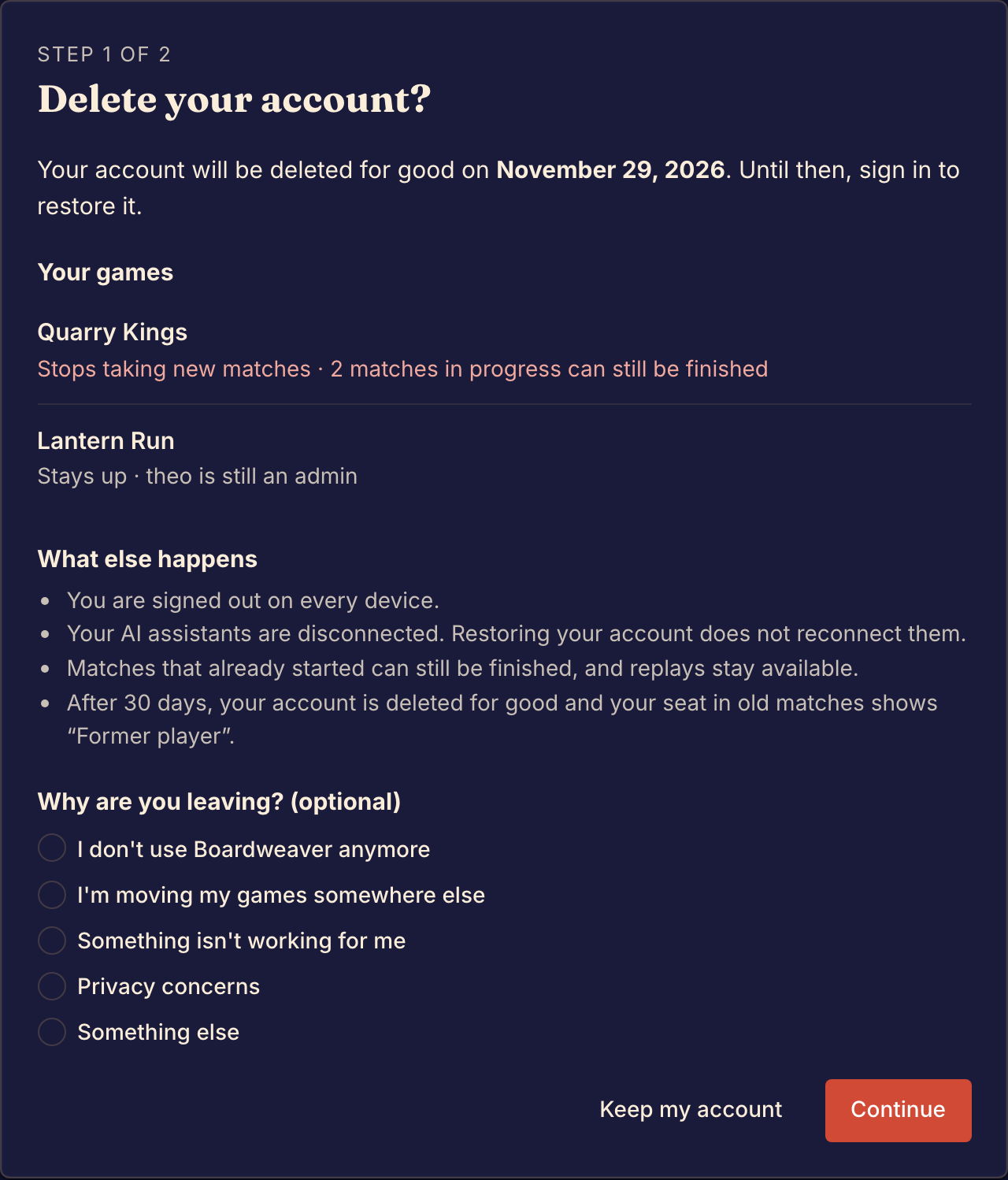
Delete your account
- Open the account menu, select Settings, then the Account tab.
- Select Delete account…. The Delete your account? page opens.
- Read what happens to each game under Your games.
- Choose an answer under Why are you leaving? (optional), or leave it empty.
- Select Continue. The Confirm it's you page opens.
- If your account signs in only with Discord, select Continue with Discord and sign in again. The Confirm it's you page opens again.
- Type your Username exactly as the page shows it.
- Type your Password. An account that signs in only with Discord has no Password field.
- Select Delete my account.
Boardweaver signs you out on every device and shows Your account is deleted. It also emails you the date when your account is deleted for good. To stop on the first page, select Keep my account.
A guest does not see the Account tab. A guest sign-in ends by itself after 7 days: see Play as a guest.
What happens to your games
The list under Your games shows each game you are an admin of. An admin is a member who manages the game: see Roles and permissions.
| Your game | For the 30 days | After the 30 days |
|---|---|---|
| It has another admin | It stays up. | It stays up, and you are no longer a member. |
| It has no other admin | It stops taking new matches. Matches that already started can still be finished. | Boardweaver deletes the game. |
The other members of a game that stops taking new matches see a notice at the top of the Studio.
What else happens
- Your AI assistants are disconnected. Restoring your account does not connect them again: see Connect a coding agent.
- Matches that already started can still be finished, and their replays stay available.
- After 30 days, your account is deleted for good and your seat in old matches shows "Former player".
Restore your account
You can restore your account until the date in the email. Boardweaver sends a reminder email 3 days before that date.
- Sign in the way you did before, with your email address or with Discord. The Restore my account link in the email opens a sign-in page.
- In the Restore your account? dialog, select Restore my account.
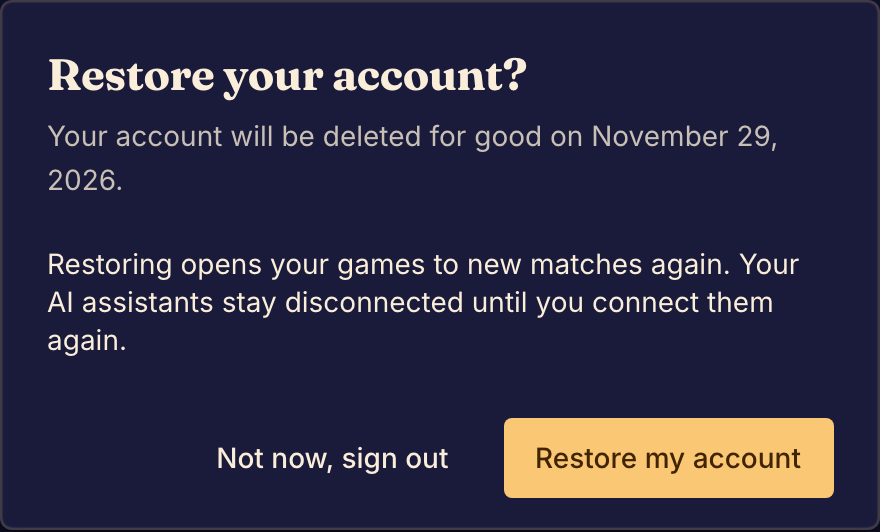
Your games take new matches again. To keep the account deleted, select Not now, sign out. The dialog shows again each time you sign in, until the date.
If something goes wrong
The page says "That isn't your username". Type your username again, exactly as the page shows it in bold.
The page says "That password is incorrect". Type your password again. If you forgot it, see Recover account access.
The page says "Sign in with Discord again to confirm it's you". Boardweaver accepts only a Discord sign-in from the last 10 minutes. Select Continue with Discord and sign in. Then type your username and select Delete my account again.
You get an email that your account is deleted, but you did not delete it. Sign in and select Restore my account. Then set a new password: see Recover account access.
If you cannot sign in to restore your account, see Recover account access.